FAMILIES | TalkingPoints
- 4.4
- Rating
- 1.00M
- Installs
- Free
- Price

 Analysis by App-foxy
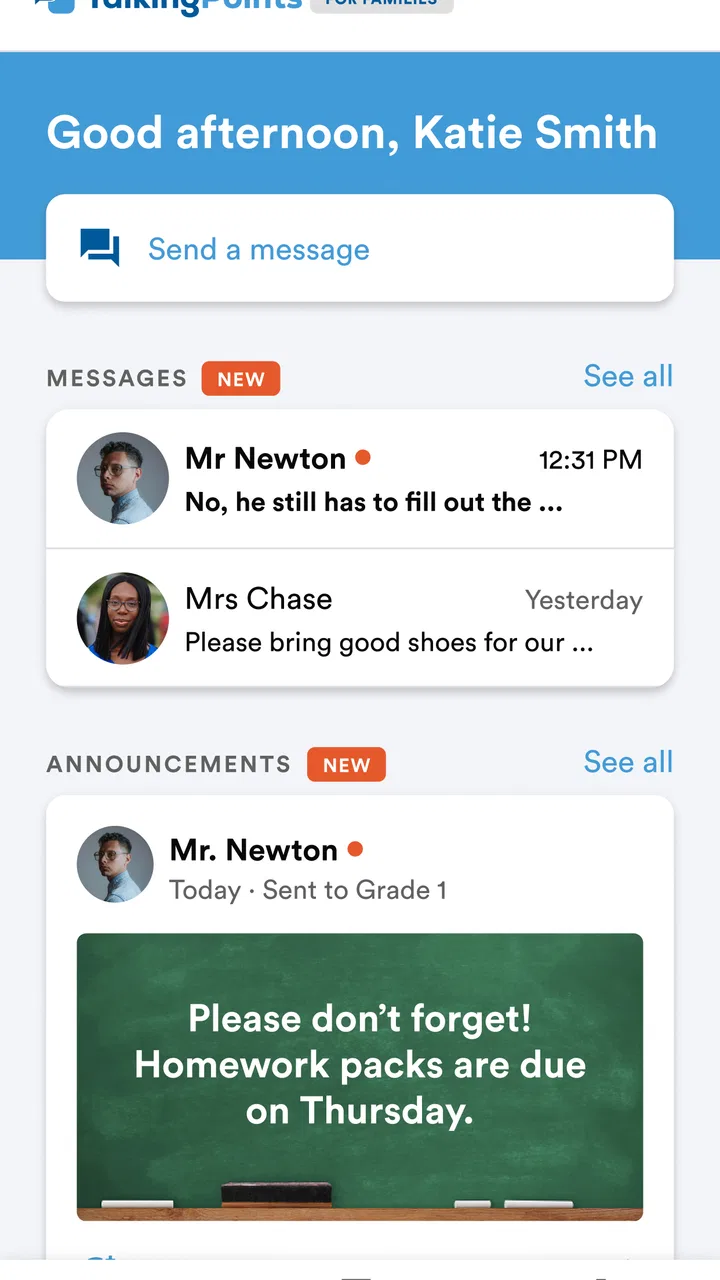
School communication often fails for a simple reason: messages are scattered across too many places. A teacher may send a note home, a family member may miss it, and a language barrier can turn a short update into a much bigger problem. I tested FAMILIES | TalkingPoints with that everyday situation in mind, and I found an education app built around making conversations between schools and families easier to follow.
My view is that this is most useful when the school already uses TalkingPoints as part of its communication routine. It is not a replacement for a full learning platform, a gradebook, or a general-purpose messaging service. Instead, it focuses on the part many families actually struggle with: receiving school information, understanding it, and replying without having to manage several unrelated channels.
The app is free, aimed at Everyone, and comes from TalkingPoints. Its education focus is clear, but the real question is practical: will it make your family’s school conversations more organized, or will it simply add another app to check? That depends less on advanced technology and more on whether teachers and families use the same communication path consistently.
You May Also Like

 Blood Strike: 2.5 Anniversary
Blood Strike’s Loadouts Turn Every Drop Into a Tactical Gamble
A close look at Blood Strike’s custom loadouts: how fast access to signature weapons reshapes its battle royale rhythm, rewards preparation, and narrows the gap between fights.

 Pandora - Music & Podcasts
Pandora’s Music Is Easy to Start, but Harder to Recover
Pandora’s strength is its low-effort path from a seed to a station. Its weak spot is how much confidence it asks you to place in connection, setup, and quiet recovery.

 8 Ball Pool
 Is Built on Rivalries, Rematches, and Routine
A close look at the rivalries, rematches, shared routines, and unanswered safety questions that turn a quick pool match into a persistent mobile community.

 Samsung Music
’s Quiet Strength Is Playing What You Already Own
Its reach comes less from spectacle than from dependable access to a personal library. That simplicity is both the app’s strongest retention engine and its ceiling.

 AccuWeather: Weather Radar
AccuWeather Review: A Quick, Clear Forecast for Everyday Decisions
For everyday plans, the best forecast is the one you can understand quickly. AccuWeather makes rain timing, radar, and local conditions easy to act on, with a few trade-offs.

 Hill Climb Racing
Why Hill Climb Racing Still Turns Crashes Into One More Run
A tiny car, a bumpy hill and one more upgrade: Hill Climb Racing keeps resurfacing because its simple chaos makes every near-miss feel personal.
More From Our News Desk



How I judged the app for real family routines
When I evaluate a school communication app, I start with access rather than appearance. A polished interface is not very helpful if a parent cannot quickly find a teacher’s message, understand what action is needed, or reply at a convenient time. I looked at FAMILIES | TalkingPoints through those basic moments: checking an announcement before work, responding to a teacher during a busy afternoon, and returning to an older conversation when a detail matters.
I also considered the difference between communication and school management. Families sometimes expect one education app to contain attendance, assignments, grades, calendars, files, and direct messages. That expectation can lead to disappointment. TalkingPoints is better understood as a communication layer. Its value comes from keeping school-to-home conversations accessible, not from trying to become the entire digital school office.
Language accessibility is another important decision point. In a multilingual school community, communication can break down even when everyone is willing to participate. A family may understand the general idea of a message but hesitate to reply because writing in the school’s preferred language feels difficult. The translation-oriented purpose of TalkingPoints makes it more relevant than ordinary chat in that situation, although families should still read important details carefully rather than assuming every translation is perfect.
Finally, I considered consistency. The app is most useful when teachers use it for regular updates and families know to look there. If one teacher uses TalkingPoints, another uses email, and a third relies on paper notices, the app cannot solve the larger organizational problem by itself. That is not a flaw unique to this product, but it is a real trade-off before asking a whole family to adopt it.
The first experience: useful when the school has already set the context
For a family, the hardest part of a school communication tool is often not opening it; it is knowing which conversations belong there. FAMILIES | TalkingPoints makes the most sense when a school or teacher has already invited the family into the relevant communication flow. In that setup, the app feels purposeful rather than like a blank inbox.
I would recommend starting with a simple routine: check the app at a predictable point in the day, read new messages fully, and reply in the same conversation instead of starting a separate channel. This sounds obvious, but it prevents a common problem with messaging tools: important context becoming divided between a school app, email, and personal texting.
The family side also benefits from a clear distinction between urgent and non-urgent communication. I would not treat an education messaging app as an emergency service unless the school explicitly says to do so. For ordinary reminders, questions, and updates, it can be a sensible home base. For immediate safety concerns or time-critical issues, the school’s stated emergency process remains more appropriate.
One practical tip is to write replies with enough context to stand alone. Instead of sending a short “yes,” I would answer with the child’s name and the specific event or request being discussed. That makes the conversation easier to understand later and reduces confusion when several school topics arrive close together.
Where TalkingPoints is especially strong
The clearest strength is its focus. FAMILIES | TalkingPoints is not trying to compete with every kind of school software at once. Its central job is to help families and educators communicate. That narrow purpose can be a major advantage for parents who do not want to learn a complicated school portal just to read a teacher’s message.
Its multilingual orientation is another meaningful strength. A normal text-message thread may technically allow a family to communicate, but it does not automatically make that communication comfortable for everyone. TalkingPoints is more appropriate for schools serving families who speak different languages at home, especially when the goal is regular two-way contact rather than occasional formal notices.
I also like the possibility of keeping communication in a recognizable history. When a teacher’s update, a family response, and a follow-up question remain connected, it is easier to reconstruct what happened. That is more useful than searching through a general inbox where school messages sit beside shopping receipts, work mail, and personal conversations.
A less obvious benefit is emotional. Some parents avoid contacting teachers because they worry about writing the wrong thing or sounding unclear. A communication tool designed for school-family exchanges can lower that barrier. The app does not remove the need to be respectful and specific, but it can make the first step feel less formal than composing a long email.
For teachers, the advantage is not simply sending more messages. The better use is sending shorter, purposeful updates that invite a response when one is needed. Families do not need a stream of minor notifications; they need information they can understand and act on. Schools that establish that habit will get more value from the app than schools that treat it as a broadcast-only channel.
A realistic afternoon use case
Imagine a parent finishing work while trying to keep track of a child’s school week. A teacher sends a reminder about an upcoming classroom activity and asks families to confirm a detail. The parent opens TalkingPoints, reads the message, and replies from the same conversation instead of looking for a separate email address. Later, the parent can return to that thread when preparing the child for the activity.
That scenario is ordinary, but it shows where the app earns its place. The value is not a dramatic feature; it is reducing the number of small decisions a family has to make. Which channel should I use? Did I send that to the right person? Was the teacher’s message in email or text? A dedicated school conversation can make those questions less frequent.
For multilingual households, the same situation has an additional layer. A family member may read the message in a more comfortable language and respond with less hesitation. That can improve participation, but I would still double-check dates, names, times, and special instructions. Translation is helpful for access, yet school details often depend on small wording differences.
What it does not replace
The biggest limitation is scope. I would not choose FAMILIES | TalkingPoints as the main tool if my priority were detailed assignment tracking, grade analysis, course materials, or a complete student information dashboard. Those needs usually belong to a learning management system or a school portal designed around academic records.
It is also not automatically the best choice for a family that already has one reliable, school-wide communication system. If every teacher uses the same portal, assignments and messages are already connected, and language access is not a concern, adding another app may create more checking rather than less. In that case, the benefit has to be clear enough to justify the extra habit.
Another limitation is participation. Communication apps work in pairs: the teacher or school must post useful information, and the family must check and answer it. If either side uses the service inconsistently, the conversation becomes incomplete. I would ask the school how widely it is used before encouraging every family member to depend on it.
There is also a human limitation that no app can fully solve. A translated or simplified message may still need clarification. Parents should feel comfortable asking follow-up questions, especially about health, transportation, permission, or schedule details. The app can make that question easier to send, but it cannot replace a direct conversation when the subject is sensitive or ambiguous.
How it compares with the usual alternatives
Email remains the most flexible alternative. Nearly every family knows how to use it, messages are easy to search, and it works well for longer explanations or formal records. However, email threads can become crowded, replies may be delayed, and language support is not usually the central experience. I would prefer email for a detailed document or a formal request, but TalkingPoints feels more focused for routine school-family contact.
Text messaging is faster and familiar, yet it can blur personal and school communication. A teacher’s message may sit beside unrelated texts, and important information can be harder to retrieve later. TalkingPoints has a clearer educational context, which matters when a family needs to separate school conversations from everything else happening on a phone.
Full school portals are stronger when families need one place for grades, assignments, attendance, calendars, and resources. Their weakness is often complexity. A portal can be powerful but intimidating, particularly for someone who only needs to answer a teacher’s short question. TalkingPoints is the better fit when communication is the priority and academic administration is handled elsewhere.
Paper notices still have a role, especially for families with limited device access or for information that must travel home physically. But paper cannot provide the same conversational trail. I see TalkingPoints as a complement to established school processes rather than a reason to discard every other form of contact.
The switching cost families should consider
Moving to any new communication app has a small but real cost. Families need to remember where messages arrive, learn how replies work, and make sure the right adults in the household are included. The transition is easier if everyone agrees on one routine instead of checking randomly throughout the day.
Schools also carry part of that cost. Teachers need a shared expectation about what belongs in TalkingPoints and what should go through another office or system. If the app is used for everything without clear boundaries, families may struggle to tell a classroom update from an administrative notice or an urgent issue.
My advice is to treat adoption as a workflow change, not merely an installation. Decide who checks messages, how quickly ordinary questions should receive a response, and which topics require a phone call or office contact. That planning is one of the most useful steps a school can take, and it does not depend on adding more features.
The app is free, which removes a direct financial barrier for families. Still, free does not mean costless: attention, notifications, account setup, and the possibility of duplicate communication all affect the experience. I would measure success by whether the app reduces missed messages and repeated questions, not by whether it costs anything to download.
Practical fit, access, and longevity
FAMILIES | TalkingPoints has been available since February 8, 2018, and its current version is 4.2613.0. It supports Android 7.0 and later, which makes it accessible to many older Android devices. That matters for families who cannot replace a phone simply because a school adopts a newer communication tool.
The app has reached over one million installs, with an average rating of 4.4 from around seventeen thousand ratings and about two thousand reviews. Those figures suggest that it has found a substantial audience, but I would still judge it by the school’s communication habits rather than popularity alone. A widely installed app can remain unhelpful if the local implementation is inconsistent.
Because the age rating is Everyone, it is suitable in the broad sense for family use. That does not mean every message is appropriate for a child to manage independently. I would keep responsibility for school communication with the parent or guardian, particularly when messages involve attendance, permissions, health, or private family circumstances.
One useful household practice is to agree on notification boundaries. If every message triggers immediate attention, the app can become stressful. If notifications are ignored completely, important updates may be missed. I would keep alerts available, then review them at a calm time and use the conversation history to decide what needs a reply.
Who should choose it, and who should skip it
I would recommend FAMILIES | TalkingPoints to families whose school actively uses it, especially when language differences make ordinary communication difficult. It is also a good fit for parents who want a dedicated place for teacher conversations without adopting a large, complicated academic portal.
It suits households with several caregivers when everyone needs visibility into school updates, provided the school’s setup supports the appropriate family contacts. The important benefit is shared context: fewer messages being forwarded manually and fewer chances for one caregiver to miss what another has already seen.
I would be more cautious for families whose school only uses the app occasionally. In that situation, the app may become one more inbox rather than the central communication route. I would also look elsewhere if my main goal were tracking coursework, grades, or long-term academic progress. A full learning platform is better designed for those tasks.
Families with limited internet access should consider whether the app fits their daily reality and ask the school about alternative communication methods. A digital channel is only inclusive when families can reliably reach it. TalkingPoints can support access across languages, but language access and device access are separate issues.
My recommendation after weighing the trade-offs
My recommendation is positive, with one important condition: use FAMILIES | TalkingPoints when it is part of a clear school-wide routine. In that setting, it offers a focused way to read updates, ask questions, and keep school conversations together. Its multilingual purpose gives it a stronger reason to exist than a basic messaging inbox.
I would not install it expecting a complete education dashboard. It is not the right answer for every school task, and it cannot repair inconsistent communication on its own. Families who already have an effective all-in-one portal may prefer to stay there, while families who mainly need accessible teacher contact may find TalkingPoints much easier to live with.
The best way to get value from it is simple: check it at a regular time, reply in the existing thread, write enough context for the message to make sense later, and confirm important details when translation or wording is unclear. Those habits turn a basic communication channel into a dependable part of the school week.
After considering the alternatives, I see this app as a practical choice rather than an all-purpose solution. TalkingPoints, developed by TalkingPoints, has earned its place for families who need school communication to be more direct and inclusive. If that is your situation, I would give it a try; if your need is academic management rather than conversation, I would choose a different category of app.
FAQs for FAMILIES | TalkingPoints
01What is FAMILIES | TalkingPoints, and who is it designed for?
FAMILIES | TalkingPoints is a communication app designed to help schools, teachers, and families stay connected through messages, announcements, updates, and translated conversations. It is mainly intended for parents or guardians whose children attend a participating school or classroom. The app is most useful when educators actively use TalkingPoints to share academic information, reminders, attendance notices, or other school-related communications.
02Do I need an invitation or access code to use FAMILIES | TalkingPoints?
In most cases, you cannot use the app fully without being connected to a participating school, teacher, or educational program. Families are generally added through school records, an invitation, a phone number, or another contact detail provided to the school. If your child’s classroom does not appear after installing the app, contact the teacher or school office and confirm that your information was entered correctly.
03Does FAMILIES | TalkingPoints support translation for multilingual families?
Yes, one of the app’s main purposes is to make school communication more accessible to families who speak different languages. Messages may be translated between the language selected by the family and the language used by the educator. Translation quality can vary depending on wording, abbreviations, and context, so important details such as dates, medication instructions, or emergency information should still be checked carefully when possible.
04Is FAMILIES | TalkingPoints free for parents and guardians?
Families can generally download and use the app without paying a subscription fee. Access is usually provided through a school or educational organization that uses TalkingPoints for communication. However, normal mobile data charges may apply when using cellular internet, and some features or availability can depend on the school’s account and setup. Verify that you are downloading the official app before entering personal information.
05What personal information and notifications does the app require?
FAMILIES | TalkingPoints may use contact details such as a phone number or email address to connect you with your child’s school communications. Depending on the setup, it may also request permission to send notifications so you do not miss teacher messages, announcements, or reminders. Review the app’s privacy policy and your device permissions, and keep your contact information updated with the school to avoid missing important updates.
Pros
- Simple interface makes family-school communication easy to follow.
- Supports translation for families who speak different languages.
- Messages can be accessed from a convenient mobile app.
- Helps keep important school updates in one organized place.
- Useful for sharing announcements
- reminders
- and student-related information.
Cons
- Availability and features may depend on the school’s TalkingPoints setup.
- Some translations may lose nuance or contain occasional inaccuracies.
- Requires internet access for timely message delivery and updates.
- Notification settings may need adjustment to avoid missed messages.
- Not useful unless the child’s school or teacher actively uses the platform.

FAMILIES | TalkingPoints
Gallery